MySQL (Databases)
What are MySQL databases for and how to use them?
MySQL databases are used to store plugin data and synchronize data between servers in a network. Data stored in the database does not take up space on the server disk.
Creating a Database
To create a database:
-
Go to the server control panel.
-
Navigate to the “Databases” tab.
-
Create a new database and come up with a name for it according to the plugin you are going to use it for.
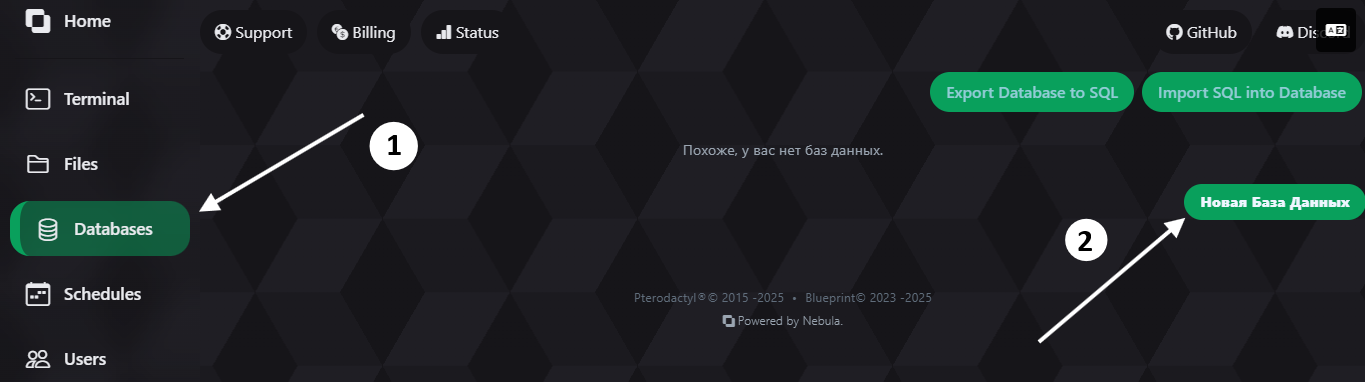
- Click on the “eye” icon to see the database parameters.

- Done! You have created a database.
Connecting a Database to a Plugin
Now let’s move on to connecting the database to a plugin. As an example, we will use the CoreProtect plugin.
-
Go to the Files tab in the plugin directory (
plugins/CoreProtect). -
Open
config.yml. -
Find the data storage settings. First, you need to enable MySQL support in the plugin. In this case, you need to set
use-mysql: true

- Copy the necessary information into the corresponding fields. It is recommended to put the password in quotes
" ", as it may contain special characters. Also pay attention to the database name - it must exactly match the value from the panel.

- Save the config and restart the server.
Working with Other Plugins
Other plugins work the same way, but there are some exceptions where databases are placed in a separate .yml file. Everything is done logically - just look for a place where you need to enter the fields that are given to you in the control panel.